
PDF Candy Desktop2.94 - Download
You'll be able to download in few seconds.
Publisher Description
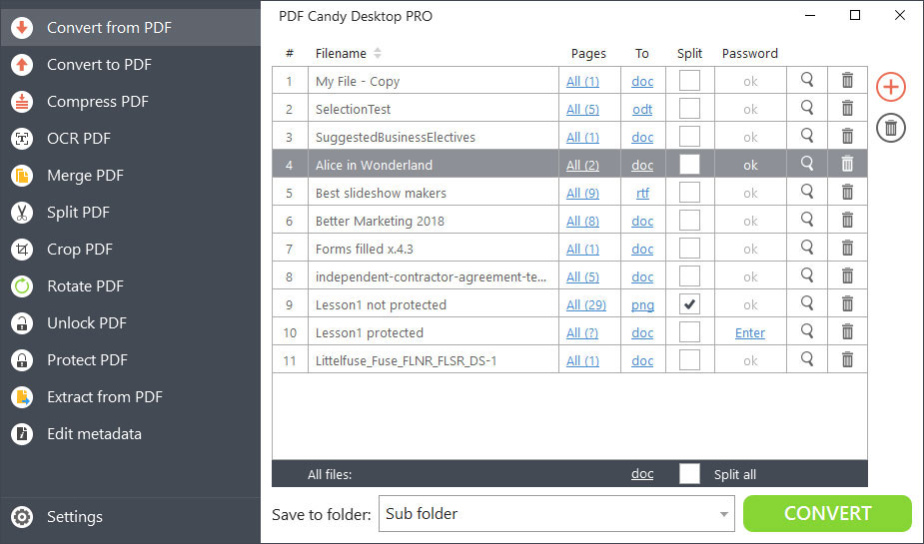
PDF Candy Desktop is a powerful software with plenty of tools to work with PDF files. Thanks to intuitive user-friendly interface and modern design, it is very simple to use this program. Drag and drop mechanism is supported. It's possible to add password-protected PDF files (a valid password per each file is required) and to preview all the added PDF files.
Convert from PDF mode of PDF Candy Desktop converts input PDF files to files of supported output formats: text (DOC, DOCX, RTF, ODT), images (JPG, BMP, TIFF, GIF) and EPS, WMF.
Convert to PDF mode supports conversion of documents (DOCX, XLS, XLSX, ODT, ODS), ebook files (ePub, MOBI, FB2), images (JPG, PNG, BMP, TIFF) and HTML and HTM files to PDF. All the files added to the queue can be merged into a single PDF if needed. There are also advanced options to set for output PDF files.
Compress PDF mode offers a way to compress the added PDF file in 1 mouse click.
OCR PDF mode is a way to digitize scanned documents and convert them to DOC, DOCX, RTF or ODT formats. It is possible to select the language of OCR for the best conversion results.
Merge PDF mode will help users to easily merge multiple files into a single one. Advanced settings for the output PDF are available.
Split PDF mode has 4 various split modes to choose from. One can delete the pages from PDF, split a file into single pages, split the file by groups of pages or by page ranges.
To crop a PDF one needs to upload a file and manually place the new borders to be applied for the output files.
To rotate a PDF with Rotate PDF tool simply set a rotation angle (90, 180 or 270 degrees).
Unlock PDF tool removes the protection from PDF if a valid password is inserted.
Protect PDF applies a password to a selected PDF file.
Extract from PDF is a tool that can extract either text or images from the uploaded PDF documents.
Edit metadata mode edits such PDF metadata as author, title, subject, keywords and dates of creation and modification.
About PDF Candy Desktop
This Office Suites & Tools program is available in English, ChineseTraditional, Dutch, French, German, Indonesian, Italian, Japanese, Portuguese, Russian, Spanish, Swedish, Turkish, Vietnamese. It was last updated on 29 September, 2026. PDF Candy Desktop is compatible with the following operating systems: Windows.
The company that develops PDF Candy Desktop is Icecream Apps. The latest version released by its developer is 2.94.
The download we have available for PDF Candy Desktop has a file size of 144.7 MB. Just click the green Download button above to start the downloading process. The program is listed on our website since 2023-04-20 and was downloaded 0 times. We have already checked if the download link is safe, however for your own protection we recommend that you scan the downloaded software with your antivirus. Your antivirus may detect the PDF Candy Desktop as malware if the download link is broken.
How to install PDF Candy Desktop on your Windows device:
- Click on the Download button on our website. This will start the download from the website of the developer.
- Once the PDF Candy Desktop is downloaded click on it to start the setup process (assuming you are on a desktop computer).
- When the installation is finished you should be able to see and run the program.
Program Details
General
System requirements
Download information
Pricing
Version History
version 2.94
posted on 2023-04-20
CSV to PDF conversion added.
version 2.93
posted on 2022-03-10
PRO activation bug fixes and improvements
version 2.87
posted on 2020-02-20
- HiDPI fixes;
- Default output folder fixes;
- Output folder options added in some tools.
version 2.79
posted on 2019-02-26
'Edit PDF metadata' tool improved
Disclaimer
External Download
We do not host PDF Candy Desktop on our servers. We did not scan it for viruses, adware, spyware or other type of malware. This app is hosted by the software publisher and passed their terms and conditions to be listed there. We recommend caution when installing it.
The external download link for PDF Candy Desktop is provided to you by apps112.com without any warranties, representations or guarantees of any kind, so access it at your own risk.
If you have questions regarding this particular app contact the publisher directly. For questions about the functionalities of apps112.com contact us.
